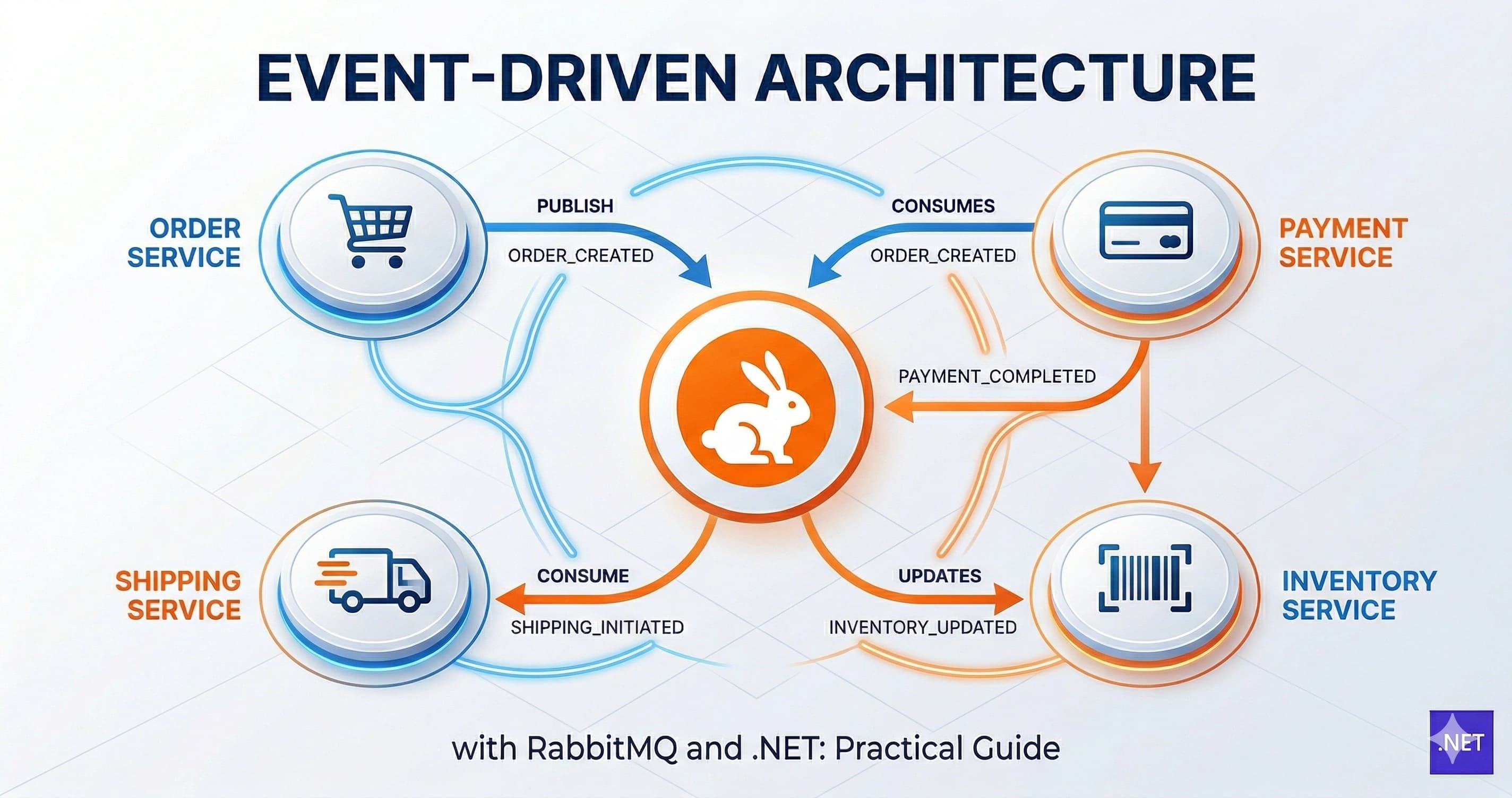
Most backend developers I know hit the same wall at some point: a system that started clean and synchronous slowly becomes a tangle of HTTP calls, timeouts, and cascading failures. One slow service takes down three others. Retries pile up. On-call alerts at 2 AM follow.
Event-driven architecture with RabbitMQ is the pattern that untangles this mess. Instead of Service A calling Service B directly, A publishes an event to a message broker. B — and C, and D — consume it at their own pace. If B goes down, the message waits. When B recovers, it picks up right where it left off.
In this post, I'll walk through how I implement EDA in .NET using RabbitMQ: the core concepts, setting up a producer and consumer with RabbitMQ.Client, choosing the right exchange type, handling failures with dead-letter queues, and the production lessons I wish I'd known earlier.
Why Event-Driven Architecture Changes the Game
The conventional alternative to EDA is a chain of synchronous HTTP calls — sometimes called a "request-driven" architecture. It's easy to reason about, right up until it isn't.
When OrderService calls InventoryService, which calls NotificationService, you've built a synchronous dependency chain. Latency in InventoryService becomes latency in OrderService. A crash in NotificationService causes order placements to fail. The services are coupled at runtime, even if they're deployed separately.
Event-driven architecture breaks this coupling. OrderService publishes an OrderPlaced event. InventoryService and NotificationService each consume that event independently. Neither knows the other exists. Neither depends on the other being available at the same moment.
This is the core trade-off EDA makes: you gain decoupling, resilience, and scalability at the cost of eventual consistency and increased operational complexity. In my experience, for most backend services beyond a certain scale, it's a trade-off worth making.
Where RabbitMQ Fits
RabbitMQ is an open-source message broker that implements the AMQP protocol. It's battle-tested, has excellent .NET client support, and runs comfortably on Docker — which means I can run a local broker in seconds for development.
The Microsoft .NET microservices architecture guide uses RabbitMQ as the reference message broker for its eShopOnContainers sample, which tells you something about its credibility in the .NET ecosystem.
Core Concepts Before the Code
Before wiring up a producer and consumer, it's worth locking in the mental model. I've seen developers jump straight to code and end up confused about why messages aren't routing the way they expect.
The Four Moving Parts
- Producer: the service that publishes a message (e.g., OrderService publishing
OrderPlaced) - Exchange: receives messages from producers and routes them to queues based on rules
- Queue: the buffer where messages wait until a consumer picks them up
- Consumer: the service that receives and processes messages from a queue
Crucially, producers never send directly to a queue. They send to an exchange, which decides where the message goes. This is what makes RabbitMQ's routing flexible.
Exchange Types
Choosing the right exchange type is one of the first real decisions you make:
- Direct: routes messages to queues with an exact matching routing key. Use for point-to-point events like
order.created. - Fanout: broadcasts to all bound queues, ignoring routing keys. Use when every subscriber needs every event — think audit logs or cache invalidation.
- Topic: matches routing keys using wildcard patterns (
*for one word,#for zero or more). My go-to for multi-service systems where events have logical namespaces likeorder.#. - Headers: routes based on message headers instead of routing keys. Rarely used in my projects — topic covers most cases.
Setting Up RabbitMQ and Your .NET Project
Running RabbitMQ with Docker
docker run -d --name rabbitmq \
  -p 5672:5672 \
  -p 15672:15672 \
  rabbitmq:3-management
This starts RabbitMQ with the management UI at http://localhost:15672 (default credentials: guest / guest). I keep this running locally throughout development — the management UI is invaluable for watching queues fill up and messages flow.
Installing the Client Package
dotnet add package RabbitMQ.Client
The official RabbitMQ .NET client is the standard choice. For production projects I also add Microsoft.Extensions.Hosting so consumers run as hosted services — more on that shortly.
Connection Factory Setup
I always centralize connection setup. In ASP.NET Core, I register it as a singleton:
builder.Services.AddSingleton<IConnectionFactory>(_ =>
    new ConnectionFactory
    {
        HostName = builder.Configuration["RabbitMQ:Host"] ?? "localhost",
        Port = 5672,
        UserName = builder.Configuration["RabbitMQ:Username"] ?? "guest",
        Password = builder.Configuration["RabbitMQ:Password"] ?? "guest",
        DispatchConsumersAsync = true // required for async consumers
    });
Setting DispatchConsumersAsync = true is non-negotiable for async consumers in .NET. Without it, your await calls inside the consumer will deadlock. I've been bitten by this once — it cost me an afternoon of head-scratching.
Building the Producer and Consumer
Publishing an Event
Let's say OrderService needs to publish an OrderPlacedEvent whenever a new order is created.
public class OrderEventPublisher
{
    private readonly IConnectionFactory _factory;

    public OrderEventPublisher(IConnectionFactory factory)
    {
        _factory = factory;
    }

    public async Task PublishOrderPlacedAsync(OrderPlacedEvent evt)
    {
        using var connection = await _factory.CreateConnectionAsync();
        using var channel = await connection.CreateChannelAsync();

        // Declare a topic exchange
        await channel.ExchangeDeclareAsync(
            exchange: "orders",
            type: ExchangeType.Topic,
            durable: true,
            autoDelete: false);

        var body = Encoding.UTF8.GetBytes(JsonSerializer.Serialize(evt));

        var props = new BasicProperties { Persistent = true };

        await channel.BasicPublishAsync(
            exchange: "orders",
            routingKey: "order.placed",
            mandatory: false,
            basicProperties: props,
            body: body);
    }
}
Two things I always set on published messages:
Persistent = true— tells RabbitMQ to write the message to disk. Without this, a broker restart loses all in-flight messages.durable: trueon the exchange and queue — ensures they survive broker restarts.
Consuming Events with a Hosted Service
I always implement consumers as BackgroundService instances so they start with the app and run for its lifetime. This is far cleaner than spinning up consumers in a controller.
public class OrderPlacedConsumer : BackgroundService
{
    private readonly IConnectionFactory _factory;
    private readonly ILogger<OrderPlacedConsumer> _logger;

    public OrderPlacedConsumer(IConnectionFactory factory,
        ILogger<OrderPlacedConsumer> logger)
    {
        _factory = factory;
        _logger = logger;
    }

    protected override async Task ExecuteAsync(CancellationToken stoppingToken)
    {
        var connection = await _factory.CreateConnectionAsync(stoppingToken);
        var channel = await connection.CreateChannelAsync(cancellationToken: stoppingToken);

        await channel.ExchangeDeclareAsync("orders", ExchangeType.Topic,
            durable: true, autoDelete: false);

        // Dead-letter queue setup (see next section)
        var queueArgs = new Dictionary<string, object?>
        {
            { "x-dead-letter-exchange", "orders.dlx" },
            { "x-dead-letter-routing-key", "order.placed.dead" }
        };

        await channel.QueueDeclareAsync(
            queue: "inventory.order-placed",
            durable: true,
            exclusive: false,
            autoDelete: false,
            arguments: queueArgs);

        await channel.QueueBindAsync(
            queue: "inventory.order-placed",
            exchange: "orders",
            routingKey: "order.placed");

        await channel.BasicQosAsync(prefetchSize: 0, prefetchCount: 10, global: false);

        var consumer = new AsyncEventingBasicConsumer(channel);

        consumer.ReceivedAsync += async (_, ea) =>
        {
            try
            {
                var json = Encoding.UTF8.GetString(ea.Body.ToArray());
                var evt = JsonSerializer.Deserialize<OrderPlacedEvent>(json);

                _logger.LogInformation("Processing OrderPlaced: {OrderId}", evt?.OrderId);

                // Your business logic here
                await ProcessOrderPlacedAsync(evt!, stoppingToken);

                await channel.BasicAckAsync(ea.DeliveryTag, multiple: false);
            }
            catch (Exception ex)
            {
                _logger.LogError(ex, "Failed to process message {DeliveryTag}", ea.DeliveryTag);
                // Nack without requeue — sends to dead-letter queue
                await channel.BasicNackAsync(ea.DeliveryTag, multiple: false, requeue: false);
            }
        };

        await channel.BasicConsumeAsync(
            queue: "inventory.order-placed",
            autoAck: false,
            consumer: consumer);

        await Task.Delay(Timeout.Infinite, stoppingToken);
    }

    private Task ProcessOrderPlacedAsync(OrderPlacedEvent evt, CancellationToken ct)
    {
        // Adjust inventory, send email, etc.
        return Task.CompletedTask;
    }
}
Notice autoAck: false. With auto-ack enabled, RabbitMQ removes the message from the queue the instant it's delivered — before your consumer finishes processing it. If your consumer crashes mid-processing, the message is gone. Manual ack means the message stays in the queue until you explicitly call BasicAckAsync.
Also notice BasicQosAsync(prefetchCount: 10). This limits how many unacknowledged messages RabbitMQ will push to this consumer at once. Without it, RabbitMQ floods the consumer with every queued message simultaneously — a memory disaster under load.
Register the consumer in Program.cs:
builder.Services.AddHostedService<OrderPlacedConsumer>();
Production Best Practices and Lessons Learned
Dead-Letter Queues: Don't Lose Failed Messages
The most common production mistake I see is handling consumer exceptions with requeue: true. This creates an instant retry loop: the message fails, goes back to the head of the queue, gets redelivered immediately, fails again — forever. CPU spikes, logs flood, the queue grinds to a halt.
The correct approach is dead-letter queues (DLQ). Configure a dead-letter exchange on your main queue (as shown above in queueArgs). When a message is nacked with requeue: false, RabbitMQ automatically routes it to the DLQ. From there, you can:
- Alert on DLQ depth (spike = processing problem)
- Inspect failed messages in the management UI
- Replay them once the bug is fixed
Set up the DLQ exchange and queue declaratively at startup:
await channel.ExchangeDeclareAsync("orders.dlx", ExchangeType.Direct, durable: true);
await channel.QueueDeclareAsync("inventory.order-placed.dead", durable: true,
    exclusive: false, autoDelete: false);
await channel.QueueBindAsync("inventory.order-placed.dead", "orders.dlx",
    routingKey: "order.placed.dead");
Idempotent Consumers Are Not Optional
RabbitMQ guarantees at-least-once delivery — not exactly-once. Under certain failure conditions (consumer crash after processing but before acking), a message can be delivered twice.
Your consumer logic must be idempotent. My standard approach: store a ProcessedMessageId in the database and check it before handling:
if (await _db.ProcessedMessages.AnyAsync(m => m.MessageId == evt.MessageId))
{
    await channel.BasicAckAsync(ea.DeliveryTag, false);
    return; // already handled, skip
}
This pairs naturally with the Outbox Pattern — if you're not familiar with it, I covered it in depth separately. Combined, they give you reliable, exactly-once-effective event processing.
Connection Pooling and Resilience
Don't create a new connection per publish. Connections in RabbitMQ are heavyweight TCP connections. Creating one per message will exhaust your broker fast.
The pattern I use in production: a single long-lived connection singleton, with channels created per operation. For publisher-heavy services, consider a channel pool.
Also, add reconnection logic. Networks fail. RabbitMQ restarts during deploys. The RabbitMQ .NET client documentation covers automatic recovery — enable it with AutomaticRecoveryEnabled = true on the ConnectionFactory.
Monitoring Queue Depth
In production, I always export RabbitMQ metrics to Prometheus via the RabbitMQ Prometheus plugin and build a Grafana dashboard. The single most important metric: queue depth. If messages are accumulating faster than consumers process them, you either have a consumer bottleneck or a downstream service degraded.
Set alerts at meaningful thresholds. A queue depth of 10,000+ at 2 AM is a better wake-up call than a timeout exception somewhere downstream.
Key Takeaways
- EDA decouples services at runtime — producers and consumers don't need to be available simultaneously, which dramatically improves resilience.
- Always use durable exchanges and queues + persistent messages — without these, a broker restart silently loses everything.
- Set
autoAck: falseand manually ack after successful processing — never let RabbitMQ assume success before your business logic completes. - Use
BasicQoswith a reasonableprefetchCount— without it, RabbitMQ floods your consumer with unbounded messages and memory blows up. - Dead-letter queues are not optional in production — nacking with
requeue: truecreates infinite retry loops; route failures to a DLQ instead. - Make every consumer idempotent — at-least-once delivery is RabbitMQ's guarantee, so deduplication logic belongs in your handler, not somewhere else.
- Don't create connections per publish — use a singleton connection and per-operation channels to avoid exhausting the broker.
- Export queue metrics to Prometheus + Grafana — queue depth is the leading indicator of trouble before your users notice anything.
Conclusion
The shift from synchronous HTTP chains to event-driven architecture with RabbitMQ is one of the highest-leverage architectural improvements I've made in production .NET systems. Services become independently deployable, independently scalable, and dramatically more resilient to partial failures.
The setup isn't trivial — dead-letter queues, idempotency, connection management, and monitoring all need attention. But once the plumbing is in place, adding a new consumer to an existing event is as simple as declaring a new queue binding. That kind of extensibility compounds over time.
If this post was useful, drop a comment or share it with your team. And if you want to go deeper on the reliability patterns that complement EDA — like the Outbox Pattern and idempotency — there's more on steve-bang.com.
FAQ
Q: What is event-driven architecture in .NET? A: Event-driven architecture is a design pattern where services communicate by publishing and consuming events through a message broker like RabbitMQ, rather than making direct synchronous HTTP calls. This decouples services, improves scalability, and makes the system resilient to partial failures.
Q: When should I use RabbitMQ over direct HTTP calls between services? A: Use RabbitMQ when you need asynchronous fire-and-forget processing, want services to scale independently, or need message buffering during traffic spikes. Direct HTTP is simpler and better suited for synchronous request-response flows where an immediate result is required.
Q: What is a dead-letter queue in RabbitMQ? A: A dead-letter queue is where RabbitMQ routes messages that fail processing — after repeated nacks, TTL expiry, or queue overflow. Instead of losing the message, it lands in the DLQ where you can inspect, alert on, or replay it once the underlying issue is resolved.
Q: What is the difference between a direct, fanout, and topic exchange in RabbitMQ?
A: A direct exchange routes messages using an exact routing key match. A fanout exchange broadcasts to all bound queues regardless of routing key. A topic exchange uses wildcard patterns (*, #) for flexible routing — ideal when events follow a naming convention like order.placed or payment.failed.
Q: How do I ensure exactly-once message processing with RabbitMQ in .NET? A: RabbitMQ guarantees at-least-once delivery, not exactly-once. To prevent duplicate side effects, persist a processed message ID to your database and check it before handling each message. This makes your consumer idempotent, so replayed messages are safely skipped.
Related Resources
- Idempotency Failures: Why Your API Breaks Under Retry — Essential reading before building consumers; covers the exact failure modes that make idempotency mandatory in event-driven systems.
- Race Condition: The Silent Bug That Breaks Production Systems — Concurrent consumers processing the same message create race conditions; this post covers the patterns to prevent them.
- CancellationToken in .NET: Best Practices to Prevent Wasted Work — Background consumer services need proper cancellation handling; learn how to do it right here.
- Dependency Injection in .NET: The Complete Guide for 2026 — Registering connection factories, consumers, and publishers as the right service lifetime is critical; this guide covers everything you need.