Outbox Pattern: Fix Distributed Transactions in .NET
Here's a production bug I've seen more than once: an order is saved to the database, but the OrderCreated event never reaches the message broker. The payment service never triggers. The customer waits. Support tickets pile up.
The root cause is always the same — a distributed transaction problem. You're writing to two systems (database + message broker) and assuming both will succeed. They won't. Not always.
The Outbox Pattern is the fix. It's one of those patterns that sounds deceptively simple, but once you implement it correctly, it eliminates an entire class of reliability bugs. In this post, I'll show you exactly what the problem looks like, how the Outbox Pattern solves it, and how to build it cleanly in .NET with EF Core and a background worker.
The Dual-Write Problem: Why Your Events Go Missing
Let's say you have an order service. When an order is created, you need to:
- Save the order to SQL Server.
- Publish an
OrderCreatedevent to RabbitMQ (or Kafka, Azure Service Bus — pick your poison).
The naive implementation looks like this:
await _db.Orders.AddAsync(order);
await _db.SaveChangesAsync();

// What if this line throws?
await _messageBus.PublishAsync(new OrderCreatedEvent(order.Id));
This is the dual-write problem. Two operations, two systems, zero atomicity. Here's what can go wrong:
- The database save succeeds, but the broker is temporarily unavailable. Event lost.
- The application crashes between the two lines. Event lost.
- A network timeout hits
PublishAsync. Event lost or published twice.
The result is a distributed system in an inconsistent state — your database says the order exists, but downstream services have no idea.
Why You Can't Use Distributed Transactions Here
The classic fix for multi-system consistency is a two-phase commit (2PC). But in practice, most modern message brokers don't support XA transactions, and even those that do introduce significant latency and operational complexity.
The Microsoft Architecture Center explicitly recommends the Outbox Pattern as the practical alternative to 2PC for event-driven .NET applications.
How the Outbox Pattern Works
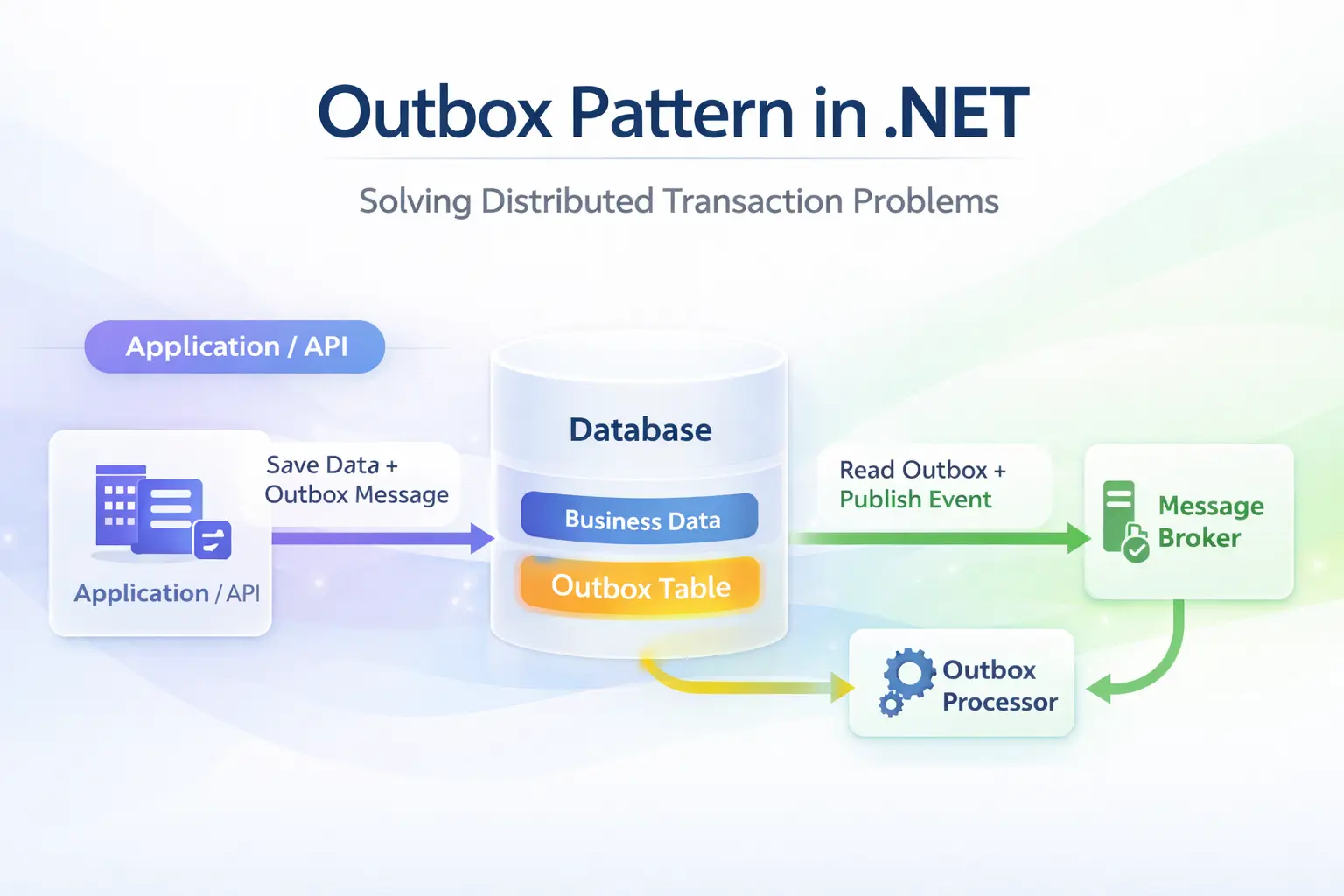
The Outbox Pattern eliminates the dual-write problem with a simple insight: if you can write to two tables in one database transaction, you get atomicity for free.
Here's the flow:
- Within your domain transaction, save your business data and insert a row into an
OutboxMessagestable — in the sameSaveChangescall. - A background worker (a
BackgroundServicein .NET) polls theOutboxMessagestable for unprocessed messages. - The worker publishes each message to the broker and marks it as processed.
The result: your database and your event stream are always consistent, even if the broker goes down temporarily.
At-Least-Once Delivery
One important nuance: the Outbox Pattern guarantees at-least-once delivery, not exactly-once. If the worker publishes a message and then crashes before marking it as processed, it will publish again on retry.
This means your consumers must be idempotent — processing the same event twice should produce the same result. I covered idempotency in depth in Idempotency Failures: Why Your API Breaks Under Retry — it's required reading if you're building event-driven systems.
Implementing the Outbox Pattern in .NET with EF Core
Let me walk through a clean implementation I've used in production. No library magic for now — understanding the raw implementation makes you much better at using libraries when you choose to.
Step 1 — Define the OutboxMessage Entity
public class OutboxMessage
{
    public Guid Id { get; set; } = Guid.NewGuid();
    public string Type { get; set; } = string.Empty;
    public string Payload { get; set; } = string.Empty;
    public DateTime CreatedAt { get; set; } = DateTime.UtcNow;
    public DateTime? ProcessedAt { get; set; }
    public string? Error { get; set; }
    public int RetryCount { get; set; } = 0;
}
Step 2 — Add It to Your DbContext
public class AppDbContext : DbContext
{
    public DbSet<Order> Orders => Set<Order>();
    public DbSet<OutboxMessage> OutboxMessages => Set<OutboxMessage>();

    protected override void OnModelCreating(ModelBuilder builder)
    {
        builder.Entity<OutboxMessage>(e =>
        {
            e.HasKey(x => x.Id);
            e.HasIndex(x => x.ProcessedAt); // critical for polling performance
        });
    }
}
That index on ProcessedAt matters in production. Without it, your polling query does a full table scan as the outbox grows.
Step 3 — Write Business Data and Outbox Message Atomically
public class CreateOrderCommandHandler
    : IRequestHandler<CreateOrderCommand, Guid>
{
    private readonly AppDbContext _db;

    public CreateOrderCommandHandler(AppDbContext db)
    {
        _db = db;
    }

    public async Task<Guid> Handle(
        CreateOrderCommand request,
        CancellationToken cancellationToken)
    {
        var order = new Order
        {
            Id = Guid.NewGuid(),
            CustomerId = request.CustomerId,
            CreatedAt = DateTime.UtcNow
        };

        var outboxMessage = new OutboxMessage
        {
            Type = nameof(OrderCreatedEvent),
            Payload = JsonSerializer.Serialize(new OrderCreatedEvent(
                order.Id,
                order.CustomerId,
                order.CreatedAt))
        };

        _db.Orders.Add(order);
        _db.OutboxMessages.Add(outboxMessage);

        // One SaveChanges = one atomic transaction
        await _db.SaveChangesAsync(cancellationToken);

        return order.Id;
    }
}
This is the key moment. Both rows land in the same SQL transaction. Either both succeed or both fail — no partial state, no lost events.
Step 4 — The Outbox Processor Background Worker
public class OutboxProcessorService : BackgroundService
{
    private readonly IServiceScopeFactory _scopeFactory;
    private readonly ILogger<OutboxProcessorService> _logger;

    public OutboxProcessorService(
        IServiceScopeFactory scopeFactory,
        ILogger<OutboxProcessorService> logger)
    {
        _scopeFactory = scopeFactory;
        _logger = logger;
    }

    protected override async Task ExecuteAsync(
        CancellationToken stoppingToken)
    {
        while (!stoppingToken.IsCancellationRequested)
        {
            await ProcessPendingMessages(stoppingToken);
            await Task.Delay(TimeSpan.FromSeconds(5), stoppingToken);
        }
    }

    private async Task ProcessPendingMessages(
        CancellationToken cancellationToken)
    {
        using var scope = _scopeFactory.CreateScope();
        var db = scope.ServiceProvider
            .GetRequiredService<AppDbContext>();
        var bus = scope.ServiceProvider
            .GetRequiredService<IMessageBus>();

        var messages = await db.OutboxMessages
            .Where(m => m.ProcessedAt == null && m.RetryCount < 5)
            .OrderBy(m => m.CreatedAt)
            .Take(20)
            .ToListAsync(cancellationToken);

        foreach (var message in messages)
        {
            try
            {
                await bus.PublishAsync(message.Type, message.Payload,
                    cancellationToken);

                message.ProcessedAt = DateTime.UtcNow;
            }
            catch (Exception ex)
            {
                _logger.LogError(ex,
                    "Failed to process outbox message {Id}", message.Id);

                message.RetryCount++;
                message.Error = ex.Message;
            }
        }

        await db.SaveChangesAsync(cancellationToken);
    }
}
Register it in Program.cs:
builder.Services.AddHostedService<OutboxProcessorService>();
Production Best Practices and Common Mistakes
The implementation above works well, but there are several lessons I've learned running this pattern under real load.
Batch Size and Polling Interval Matter
Processing 20 messages every 5 seconds is a starting point, not a fixed rule. In high-throughput systems, I tune these based on observed lag. If your outbox queue grows faster than you drain it, increase the batch size or reduce the interval — not both at once.
Use Optimistic Concurrency or Row Locking for Multi-Instance Deploys
If you run multiple instances of your service (which you should in production), multiple workers may pick up the same outbox message. Add a LockedUntil timestamp column and use pessimistic locking (SELECT ... FOR UPDATE SKIP LOCKED in PostgreSQL, or EF Core's FromSqlRaw equivalent) to claim rows exclusively.
Postgres documentation on SKIP LOCKED is the reference I use for this pattern.
Don't Grow the Outbox Table Forever
Mark processed messages and archive or delete them periodically. I run a cleanup job that deletes rows where ProcessedAt < NOW() - INTERVAL '7 days'. Without this, your polling query slows down over time regardless of the index.
Consider Using a Library for Production
For simple services, the custom implementation above is fine. For complex systems, Wolverine and MassTransit both ship with first-class Outbox Pattern support in .NET.
MassTransit's transactional outbox handles row locking, cleanup, and retry policies out of the box. I'd reach for it any time I'm building a new event-driven service from scratch.
The Outbox Pattern Pairs Well with CQRS
I use the Outbox Pattern inside CQRS command handlers — the same place domain state changes happen. Commands mutate state and write outbox messages; queries never touch the outbox. It's a clean boundary. If you haven't set up CQRS yet, my post on CQRS Pattern in .NET: From Theory to Production 2026 walks through exactly that setup.
Observability Is Non-Negotiable
Add metrics for:
- Outbox queue depth (unprocessed message count).
- Publishing latency (time between
CreatedAtandProcessedAt). - Retry count distribution.
When something goes wrong in production, these metrics are the difference between a 5-minute fix and a 2-hour war room. The OpenTelemetry .NET SDK integrates cleanly with BackgroundService for this purpose.
Key Takeaways
- The dual-write problem is silent and dangerous — your database and message broker can desync on any crash or network blip.
- The Outbox Pattern fixes this by writing business data and an outbox message in a single database transaction.
- Your background worker gets at-least-once delivery — make your consumers idempotent accordingly.
- Always index
ProcessedAtin your outbox table — full table scans will wreck performance as the table grows. - For multi-instance deployments, use row locking to prevent duplicate message processing.
- Batch size and polling interval should be tuned per service, not left at defaults.
- For production systems, consider MassTransit or Wolverine — both have mature Outbox implementations.
- Outbox Pattern + CQRS is a natural combination — your command handlers own both the domain mutation and the outbox write.
Wrapping Up
The Outbox Pattern is one of those things that feels like extra work until you've debugged a production incident where events went missing at 2am. After that, you add it to every event-driven service by default.
The core idea is elegant: use your database's existing transaction guarantee to make your event publishing reliable. No distributed coordinator, no 2PC, no operational complexity. Just a background worker polling a table.
If this helped you think through a reliability problem you're facing, drop a comment below — I'd love to hear how you're implementing it. And if you want to keep building reliable .NET backends, there's plenty more to explore at steve-bang.com.
FAQ
Q: What is the Outbox Pattern in .NET? A: The Outbox Pattern solves the dual-write problem in distributed systems. Instead of writing to a database and publishing a message in two separate operations, you write both in one database transaction. A background worker then reliably delivers the message to your broker, ensuring consistency.
Q: What problem does the Outbox Pattern solve? A: It solves the dual-write problem: saving to a database and publishing an event to a message broker are two independent operations that can fail independently. The Outbox Pattern makes event publishing atomic with your database write, guaranteeing at-least-once delivery even when the broker is temporarily unavailable.
Q: How do I implement the Outbox Pattern in .NET with EF Core?
A: Add an OutboxMessages table to your EF Core DbContext. In your command handler, save business data and insert an OutboxMessage row in a single SaveChangesAsync call. A BackgroundService polls unprocessed messages, publishes them to your broker, and marks them as processed.
Q: What is the difference between the Outbox Pattern and the Saga Pattern? A: The Outbox Pattern ensures reliable event publishing from a single service — it's a message delivery guarantee. The Saga Pattern coordinates a multi-step transaction across multiple services. They're complementary: Sagas typically use the Outbox Pattern internally to reliably publish their events at each step.
Q: Can I use a library for the Outbox Pattern in .NET?
A: Yes. MassTransit and Wolverine both provide first-class Outbox Pattern support in .NET, handling row locking, retries, and cleanup automatically. For smaller services or when you need full control, a custom EF Core + BackgroundService implementation is straightforward and highly practical.
Related Resources
-
Idempotency Failures: Why Your API Breaks Under Retry — Required reading alongside the Outbox Pattern — your consumers must handle duplicate events gracefully.
-
CQRS Pattern in .NET: From Theory to Production 2026 — The Outbox Pattern fits naturally inside CQRS command handlers. Learn how to structure both together.
-
Event Sourcing in .NET: A Practical Guide with Real-World Example and Best Practices — Event Sourcing and the Outbox Pattern are powerful architectural companions for audit-heavy systems.
-
RabbitMQ Crash Course for Beginners: The Ultimate Guide to Message Queues — The message broker your Outbox worker publishes to. Understand the plumbing before you wire it up.
-
CancellationToken in .NET: Best Practices to Prevent Wasted Work — Your
BackgroundServiceand all its async calls should handle cancellation correctly in production.